Summary
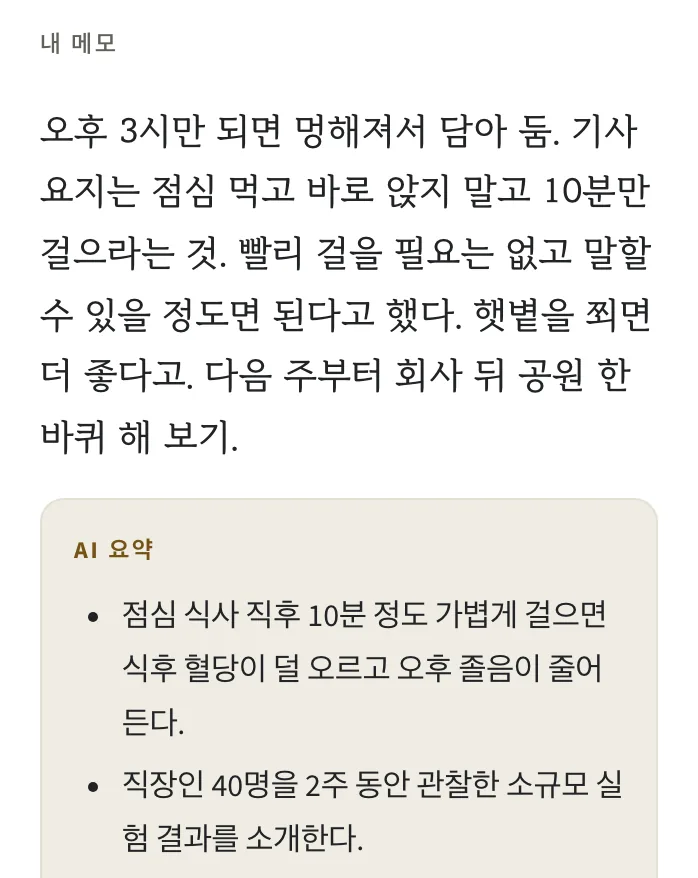
When you clip, AI usually sums the page up in 3 to 5 lines. The summary is labeled “AI summary” and kept apart from your own note. If there is nothing to summarize, the page is saved without one.

A memory box for everyday life
Gather your KakaoTalk self-chats and Notion pages here. You get the original words and the date.
Answers come only from what you saved.Six entries saved by a fictional person raising a child, who wrote things down in several places.
Ask a question and see the answer Try it with your own notes. No credit card needed.Web beta · 30-day trial, no card needed
You have to remember where you saved it
So you won’t forget, you write it in Notes, send it to yourself on KakaoTalk, and keep it in Notion too. When you need it, you open those apps one by one.
What you remember is “the place Mom liked.” What you saved is a restaurant name. You are stuck before you even know which word to search for.
“Where was that place Mom liked?” Ask with just what you remember. askora looks through what you saved.
How people use it
Four moments, using a fictional person’s entries.
Put in
Ask
What did my daughter say she wanted?
Answer
I decided to get her a Catch Tiniping doll for her next birthday.
Just put things in. When you wonder, ask, and you get your own sentence and its date.
Put in
Ask
What did that video say about back stretches?
Answer
It said to do the kneeling cat pose twice a day.
Tap the time and the video opens at that moment. Check it, then open the entry.
Put in
Ask
What did Hanbit insist on putting in the contract?
Answer
They asked for the free repair to be extended one year, 2 years in total.
Move a whole vault in and each note lands on its own date. Categories can be sorted for you.
Put in
Ask
What was the name of the restaurant I went to with Mom?
Answer
Jeju Olle Noodles. The anchovy noodles were great.
Links and notes you sent yourself come back from the day you sent them.
Chrome extension · Clip
You don't have to finish the video or read the whole article. When you clip it, AI usually sums it up in 3 to 5 lines.
Once clipped, you can find it by asking months later. In Chrome, it takes one click.
When you clip, AI usually sums the page up in 3 to 5 lines. The summary is labeled “AI summary” and kept apart from your own note. If there is nothing to summarize, the page is saved without one.
For videos with captions, each summary line gets the time it was said. Tap that time in the app to play from that moment. Without captions, the summary comes from the video description.
For articles and blog posts, the extension picks out the main text and summarizes it. The address and title are saved too.
Select the few lines you need and right-click. Those lines are saved word for word, with where they came from.
Use the toolbar icon, right-click, or the shortcut, whichever is easiest.
Toolbar iconRight-clickAlt+Shift+S
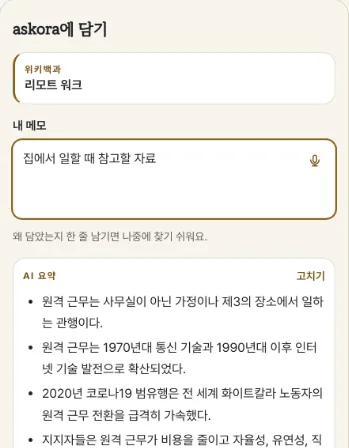
The address and title, the note you wrote, and the AI summary are saved in separate fields of one entry.
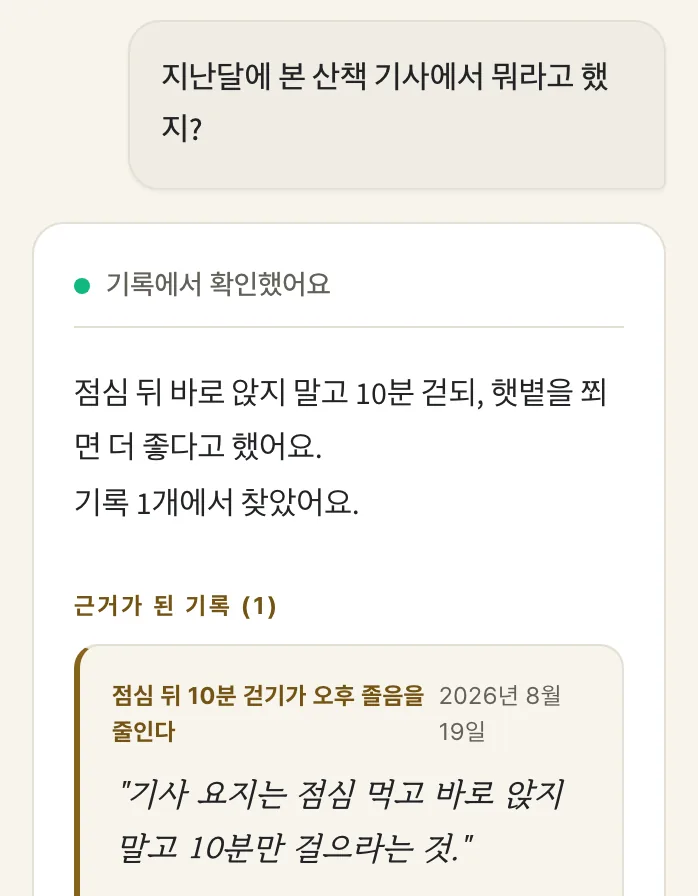
Ask “What did that video say?” and askora finds it in what you clipped, with the original text and the date.
Works in Chrome on desktop. You need an askora account, and 30 days after sign-up, clipping new pages needs a subscription.
Save
Import from Obsidian, Notion, Evernote, Google Keep, Bear, Day One, and KakaoTalk. Each note lands on its own date (the file's date if it has none), sorted into categories if you like.
Clip the YouTube video or web page you're viewing in Chrome with one click. The AI summary is labeled “AI summary.”
More about ClipType an entry or say it out loud. You can date it in the past, too.
Add up to 10 photos to an entry. When answering a question, the AI looks only at your text.
Find
Pick a sample question. The answers come from six fictional entries.
Try another questionTry the fictional entries first. No sign-up needed.
Entries used
Answer and original
Every answer shows the saved sentence as written, with the entry's title and date. The AI does not rewrite quotes.
Ask “Was the free repair 6 months?” and askora finds the closest entry and shows the “one extra year, 2 in total” you actually wrote.
When it can’t find a source in your entries, askora replies “Could not find evidence in your entries.” It shows the closest entries instead.
Ask about one topic and see the sentences scattered across a video summary, a meeting note, and a personal note, all together.
Keep asking to narrow it down. Ask about an idea from a video, then ask “At what minute?” and askora finds the 7:53 you wrote in your note.
Addresses, booking times and links you wrote down are all there to ask for.
Underline a passage as you read, and it is saved word for word under “Underlines.” Tap it to jump back to that spot in the entry.
Tap a time in an answer (7:53) and YouTube plays from that moment.
Listen
Listening with your device's built-in voice is free.
The AI voice reads 3 entries during the trial and up to 60 minutes a month with a subscription.
Before reading an AI summary, it says “AI summary.”
Listen to each language
Why you can trust it
Every answer comes with its source. See which entry it came from and when you wrote it. Quotes come only from your saved text, and the AI never edits the original. If it finds no source, it tells you so.
Keep some entries apart, in the Vault. The AI does not use Vault entries when it answers.
Export as MD, PDF, TXT, or JSON. After a subscription ends, you can still read and export.
No ads. Your entries are never sold or used to train AI. To answer, related sentences are sent to AI providers (never Vault entries).
Planned launch pricing
Start here
₩0
Every feature from the day you sign up. No card on file.
Keep saving, keep asking
₩59,000 / 년
About $5.00 per month, billed yearly. Renews automatically.
Paid subscriptions open at launch.
No payment is taken on this page.
Planned Founder rate: $39.99 per year for the first 200 paid members. Founder is a yearly subscription that renews. You keep this price while your subscription stays active.
When the trial ends, new entries and AI features pause. You can still read, search, export, and delete what you saved.
Yes. Zip your vault and upload it at once, or pick several .md files. Each upload can be up to 500 MB, with no limit on the number of files. Each note becomes one entry on its own date (the file's date if it has none), and before the import you choose to sort them into categories or keep them all Unsorted.
Ask, and askora picks sentences from the relevant entries and shows them with their dates. If it can’t find a source, it replies “Could not find evidence in your entries.”
The address, title, AI summary, and your note. The AI summary is labeled “AI summary.”
Yes. They go in like any other entry, and answers quote their original sentences.
Nothing is deleted. You can keep reading, searching, exporting, and deleting. New entries and AI features open again with a subscription after launch.
No. There are no ads, and your entries are never sold. To answer, though, sentences from entries related to your question are sent to AI providers. When we send through OpenRouter, we ask it to skip providers that store content or train on it. Entries in the Vault are not sent.
Entries are stored in a Supabase database in Seoul (the operator is in the US). For an AI answer, sentences from up to 12 entries related to your question are sent through OpenRouter to OpenAI, and sentence vectors are made by a Google model (US). For a link summary, the page text you pasted goes the same way and is not stored; for a YouTube link, only the video address goes to Google Gemini. AI voice sends part of the entry's text to Google only when you choose it. For voice writing, askora's servers do not receive your voice. Entries in the Vault are not sent to any AI. Details are in section 5 of the Privacy Policy.
Yes. Get the iPhone app on the App Store, or use askora on the web. The Android app is in progress.
Start with the app’s sample entries.
notoserifjp-OFL.txt
Copyright 2012 Google Inc. All Rights Reserved.

This Font Software is licensed under the SIL Open Font License,
Version 1.1.

This license is copied below, and is also available with a FAQ at:
http://scripts.sil.org/OFL

-----------------------------------------------------------
SIL OPEN FONT LICENSE Version 1.1 - 26 February 2007
-----------------------------------------------------------

PREAMBLE
The goals of the Open Font License (OFL) are to stimulate worldwide
development of collaborative font projects, to support the font
creation efforts of academic and linguistic communities, and to
provide a free and open framework in which fonts may be shared and
improved in partnership with others.

The OFL allows the licensed fonts to be used, studied, modified and
redistributed freely as long as they are not sold by themselves. The
fonts, including any derivative works, can be bundled, embedded,
redistributed and/or sold with any software provided that any reserved
names are not used by derivative works. The fonts and derivatives,
however, cannot be released under any other type of license. The
requirement for fonts to remain under this license does not apply to
any document created using the fonts or their derivatives.

DEFINITIONS
"Font Software" refers to the set of files released by the Copyright
Holder(s) under this license and clearly marked as such. This may
include source files, build scripts and documentation.

"Reserved Font Name" refers to any names specified as such after the
copyright statement(s).

"Original Version" refers to the collection of Font Software
components as distributed by the Copyright Holder(s).

"Modified Version" refers to any derivative made by adding to,
deleting, or substituting -- in part or in whole -- any of the
components of the Original Version, by changing formats or by porting
the Font Software to a new environment.

"Author" refers to any designer, engineer, programmer, technical
writer or other person who contributed to the Font Software.

PERMISSION & CONDITIONS
Permission is hereby granted, free of charge, to any person obtaining
a copy of the Font Software, to use, study, copy, merge, embed,
modify, redistribute, and sell modified and unmodified copies of the
Font Software, subject to the following conditions:

1) Neither the Font Software nor any of its individual components, in
Original or Modified Versions, may be sold by itself.

2) Original or Modified Versions of the Font Software may be bundled,
redistributed and/or sold with any software, provided that each copy
contains the above copyright notice and this license. These can be
included either as stand-alone text files, human-readable headers or
in the appropriate machine-readable metadata fields within text or
binary files as long as those fields can be easily viewed by the user.

3) No Modified Version of the Font Software may use the Reserved Font
Name(s) unless explicit written permission is granted by the
corresponding Copyright Holder. This restriction only applies to the
primary font name as presented to the users.

4) The name(s) of the Copyright Holder(s) or the Author(s) of the Font
Software shall not be used to promote, endorse or advertise any
Modified Version, except to acknowledge the contribution(s) of the
Copyright Holder(s) and the Author(s) or with their explicit written
permission.

5) The Font Software, modified or unmodified, in part or in whole,
must be distributed entirely under this license, and must not be
distributed under any other license. The requirement for fonts to
remain under this license does not apply to any document created using
the Font Software.

TERMINATION
This license becomes null and void if any of the above conditions are
not met.

DISCLAIMER
THE FONT SOFTWARE IS PROVIDED "AS IS", WITHOUT WARRANTY OF ANY KIND,
EXPRESS OR IMPLIED, INCLUDING BUT NOT LIMITED TO ANY WARRANTIES OF
MERCHANTABILITY, FITNESS FOR A PARTICULAR PURPOSE AND NONINFRINGEMENT
OF COPYRIGHT, PATENT, TRADEMARK, OR OTHER RIGHT. IN NO EVENT SHALL THE
COPYRIGHT HOLDER BE LIABLE FOR ANY CLAIM, DAMAGES OR OTHER LIABILITY,
INCLUDING ANY GENERAL, SPECIAL, INDIRECT, INCIDENTAL, OR CONSEQUENTIAL
DAMAGES, WHETHER IN AN ACTION OF CONTRACT, TORT OR OTHERWISE, ARISING
FROM, OUT OF THE USE OR INABILITY TO USE THE FONT SOFTWARE OR FROM
OTHER DEALINGS IN THE FONT SOFTWARE.


pretendard-OFL.txt
Copyright (c) 2021, Kil Hyung-jin (https://github.com/orioncactus/pretendard),
with Reserved Font Name 'Pretendard'.

Copyright 2014-2021 Adobe (http://www.adobe.com/),
with Reserved Font Name 'Source'.
Source is a trademark of Adobe in the United States and/or other countries.

Copyright (c) 2016 The Inter Project Authors (https://github.com/rsms/inter),
with Reserved Font Name 'Inter'.

Copyright 2021 The M+ FONTS Project Authors (https://github.com/coz-m/MPLUS_FONTS),
with Reserved Font Name 'M PLUS 1'.

This Font Software is licensed under the SIL Open Font License, Version 1.1.
This license is copied below, and is also available with a FAQ at:
https://scripts.sil.org/OFL


-----------------------------------------------------------
SIL OPEN FONT LICENSE Version 1.1 - 26 February 2007
-----------------------------------------------------------

PREAMBLE
The goals of the Open Font License (OFL) are to stimulate worldwide
development of collaborative font projects, to support the font creation
efforts of academic and linguistic communities, and to provide a free and
open framework in which fonts may be shared and improved in partnership
with others.

The OFL allows the licensed fonts to be used, studied, modified and
redistributed freely as long as they are not sold by themselves. The
fonts, including any derivative works, can be bundled, embedded,
redistributed and/or sold with any software provided that any reserved
names are not used by derivative works. The fonts and derivatives,
however, cannot be released under any other type of license. The
requirement for fonts to remain under this license does not apply
to any document created using the fonts or their derivatives.

DEFINITIONS
"Font Software" refers to the set of files released by the Copyright
Holder(s) under this license and clearly marked as such. This may
include source files, build scripts and documentation.

"Reserved Font Name" refers to any names specified as such after the
copyright statement(s).

"Original Version" refers to the collection of Font Software components as
distributed by the Copyright Holder(s).

"Modified Version" refers to any derivative made by adding to, deleting,
or substituting -- in part or in whole -- any of the components of the
Original Version, by changing formats or by porting the Font Software to a
new environment.

"Author" refers to any designer, engineer, programmer, technical
writer or other person who contributed to the Font Software.

PERMISSION & CONDITIONS
Permission is hereby granted, free of charge, to any person obtaining
a copy of the Font Software, to use, study, copy, merge, embed, modify,
redistribute, and sell modified and unmodified copies of the Font
Software, subject to the following conditions:

1) Neither the Font Software nor any of its individual components,
in Original or Modified Versions, may be sold by itself.

2) Original or Modified Versions of the Font Software may be bundled,
redistributed and/or sold with any software, provided that each copy
contains the above copyright notice and this license. These can be
included either as stand-alone text files, human-readable headers or
in the appropriate machine-readable metadata fields within text or
binary files as long as those fields can be easily viewed by the user.

3) No Modified Version of the Font Software may use the Reserved Font
Name(s) unless explicit written permission is granted by the corresponding
Copyright Holder. This restriction only applies to the primary font name as
presented to the users.

4) The name(s) of the Copyright Holder(s) or the Author(s) of the Font
Software shall not be used to promote, endorse or advertise any
Modified Version, except to acknowledge the contribution(s) of the
Copyright Holder(s) and the Author(s) or with their explicit written
permission.

5) The Font Software, modified or unmodified, in part or in whole,
must be distributed entirely under this license, and must not be
distributed under any other license. The requirement for fonts to
remain under this license does not apply to any document created
using the Font Software.

TERMINATION
This license becomes null and void if any of the above conditions are
not met.

DISCLAIMER
THE FONT SOFTWARE IS PROVIDED "AS IS", WITHOUT WARRANTY OF ANY KIND,
EXPRESS OR IMPLIED, INCLUDING BUT NOT LIMITED TO ANY WARRANTIES OF
MERCHANTABILITY, FITNESS FOR A PARTICULAR PURPOSE AND NONINFRINGEMENT
OF COPYRIGHT, PATENT, TRADEMARK, OR OTHER RIGHT. IN NO EVENT SHALL THE
COPYRIGHT HOLDER BE LIABLE FOR ANY CLAIM, DAMAGES OR OTHER LIABILITY,
INCLUDING ANY GENERAL, SPECIAL, INDIRECT, INCIDENTAL, OR CONSEQUENTIAL
DAMAGES, WHETHER IN AN ACTION OF CONTRACT, TORT OR OTHERWISE, ARISING
FROM, OUT OF THE USE OR INABILITY TO USE THE FONT SOFTWARE OR FROM
OTHER DEALINGS IN THE FONT SOFTWARE.


ridibatang-OFL.txt
Copyright (c) 2019, RIDI Corporation (https://www.ridicorp.com)
with Reserved Font Name RIDIBatang.

This Font Software is licensed under the SIL Open Font License, Version 1.1.
This license is copied below, and is also available with a FAQ at:
http://scripts.sil.org/OFL


-----------------------------------------------------------
SIL OPEN FONT LICENSE Version 1.1 - 26 February 2007
-----------------------------------------------------------

PREAMBLE
The goals of the Open Font License (OFL) are to stimulate worldwide
development of collaborative font projects, to support the font creation
efforts of academic and linguistic communities, and to provide a free and
open framework in which fonts may be shared and improved in partnership
with others.

The OFL allows the licensed fonts to be used, studied, modified and
redistributed freely as long as they are not sold by themselves. The
fonts, including any derivative works, can be bundled, embedded,
redistributed and/or sold with any software provided that any reserved
names are not used by derivative works. The fonts and derivatives,
however, cannot be released under any other type of license. The
requirement for fonts to remain under this license does not apply
to any document created using the fonts or their derivatives.

DEFINITIONS
"Font Software" refers to the set of files released by the Copyright
Holder(s) under this license and clearly marked as such. This may
include source files, build scripts and documentation.

"Reserved Font Name" refers to any names specified as such after the
copyright statement(s).

"Original Version" refers to the collection of Font Software components as
distributed by the Copyright Holder(s).

"Modified Version" refers to any derivative made by adding to, deleting,
or substituting -- in part or in whole -- any of the components of the
Original Version, by changing formats or by porting the Font Software to a
new environment.

"Author" refers to any designer, engineer, programmer, technical
writer or other person who contributed to the Font Software.

PERMISSION & CONDITIONS
Permission is hereby granted, free of charge, to any person obtaining
a copy of the Font Software, to use, study, copy, merge, embed, modify,
redistribute, and sell modified and unmodified copies of the Font
Software, subject to the following conditions:

1) Neither the Font Software nor any of its individual components,
in Original or Modified Versions, may be sold by itself.

2) Original or Modified Versions of the Font Software may be bundled,
redistributed and/or sold with any software, provided that each copy
contains the above copyright notice and this license. These can be
included either as stand-alone text files, human-readable headers or
in the appropriate machine-readable metadata fields within text or
binary files as long as those fields can be easily viewed by the user.

3) No Modified Version of the Font Software may use the Reserved Font
Name(s) unless explicit written permission is granted by the corresponding
Copyright Holder. This restriction only applies to the primary font name as
presented to the users.

4) The name(s) of the Copyright Holder(s) or the Author(s) of the Font
Software shall not be used to promote, endorse or advertise any
Modified Version, except to acknowledge the contribution(s) of the
Copyright Holder(s) and the Author(s) or with their explicit written
permission.

5) The Font Software, modified or unmodified, in part or in whole,
must be distributed entirely under this license, and must not be
distributed under any other license. The requirement for fonts to
remain under this license does not apply to any document created
using the Font Software.

TERMINATION
This license becomes null and void if any of the above conditions are
not met.

DISCLAIMER
THE FONT SOFTWARE IS PROVIDED "AS IS", WITHOUT WARRANTY OF ANY KIND,
EXPRESS OR IMPLIED, INCLUDING BUT NOT LIMITED TO ANY WARRANTIES OF
MERCHANTABILITY, FITNESS FOR A PARTICULAR PURPOSE AND NONINFRINGEMENT
OF COPYRIGHT, PATENT, TRADEMARK, OR OTHER RIGHT. IN NO EVENT SHALL THE
COPYRIGHT HOLDER BE LIABLE FOR ANY CLAIM, DAMAGES OR OTHER LIABILITY,
INCLUDING ANY GENERAL, SPECIAL, INDIRECT, INCIDENTAL, OR CONSEQUENTIAL
DAMAGES, WHETHER IN AN ACTION OF CONTRACT, TORT OR OTHERWISE, ARISING
FROM, OUT OF THE USE OR INABILITY TO USE THE FONT SOFTWARE OR FROM
OTHER DEALINGS IN THE FONT SOFTWARE.


sourcesans3-OFL.txt
Copyright 2010-2020 Adobe (http://www.adobe.com/), with Reserved Font Name 'Source'. All Rights Reserved. Source is a trademark of Adobe in the United States and/or other countries.

This Font Software is licensed under the SIL Open Font License, Version 1.1.

This license is copied below, and is also available with a FAQ at: http://scripts.sil.org/OFL


-----------------------------------------------------------
SIL OPEN FONT LICENSE Version 1.1 - 26 February 2007
-----------------------------------------------------------

PREAMBLE
The goals of the Open Font License (OFL) are to stimulate worldwide
development of collaborative font projects, to support the font creation
efforts of academic and linguistic communities, and to provide a free and
open framework in which fonts may be shared and improved in partnership
with others.

The OFL allows the licensed fonts to be used, studied, modified and
redistributed freely as long as they are not sold by themselves. The
fonts, including any derivative works, can be bundled, embedded,
redistributed and/or sold with any software provided that any reserved
names are not used by derivative works. The fonts and derivatives,
however, cannot be released under any other type of license. The
requirement for fonts to remain under this license does not apply
to any document created using the fonts or their derivatives.

DEFINITIONS
"Font Software" refers to the set of files released by the Copyright
Holder(s) under this license and clearly marked as such. This may
include source files, build scripts and documentation.

"Reserved Font Name" refers to any names specified as such after the
copyright statement(s).

"Original Version" refers to the collection of Font Software components as
distributed by the Copyright Holder(s).

"Modified Version" refers to any derivative made by adding to, deleting,
or substituting -- in part or in whole -- any of the components of the
Original Version, by changing formats or by porting the Font Software to a
new environment.

"Author" refers to any designer, engineer, programmer, technical
writer or other person who contributed to the Font Software.

PERMISSION & CONDITIONS
Permission is hereby granted, free of charge, to any person obtaining
a copy of the Font Software, to use, study, copy, merge, embed, modify,
redistribute, and sell modified and unmodified copies of the Font
Software, subject to the following conditions:

1) Neither the Font Software nor any of its individual components,
in Original or Modified Versions, may be sold by itself.

2) Original or Modified Versions of the Font Software may be bundled,
redistributed and/or sold with any software, provided that each copy
contains the above copyright notice and this license. These can be
included either as stand-alone text files, human-readable headers or
in the appropriate machine-readable metadata fields within text or
binary files as long as those fields can be easily viewed by the user.

3) No Modified Version of the Font Software may use the Reserved Font
Name(s) unless explicit written permission is granted by the corresponding
Copyright Holder. This restriction only applies to the primary font name as
presented to the users.

4) The name(s) of the Copyright Holder(s) or the Author(s) of the Font
Software shall not be used to promote, endorse or advertise any
Modified Version, except to acknowledge the contribution(s) of the
Copyright Holder(s) and the Author(s) or with their explicit written
permission.

5) The Font Software, modified or unmodified, in part or in whole,
must be distributed entirely under this license, and must not be
distributed under any other license. The requirement for fonts to
remain under this license does not apply to any document created
using the Font Software.

TERMINATION
This license becomes null and void if any of the above conditions are
not met.

DISCLAIMER
THE FONT SOFTWARE IS PROVIDED "AS IS", WITHOUT WARRANTY OF ANY KIND,
EXPRESS OR IMPLIED, INCLUDING BUT NOT LIMITED TO ANY WARRANTIES OF
MERCHANTABILITY, FITNESS FOR A PARTICULAR PURPOSE AND NONINFRINGEMENT
OF COPYRIGHT, PATENT, TRADEMARK, OR OTHER RIGHT. IN NO EVENT SHALL THE
COPYRIGHT HOLDER BE LIABLE FOR ANY CLAIM, DAMAGES OR OTHER LIABILITY,
INCLUDING ANY GENERAL, SPECIAL, INDIRECT, INCIDENTAL, OR CONSEQUENTIAL
DAMAGES, WHETHER IN AN ACTION OF CONTRACT, TORT OR OTHERWISE, ARISING
FROM, OUT OF THE USE OR INABILITY TO USE THE FONT SOFTWARE OR FROM
OTHER DEALINGS IN THE FONT SOFTWARE.


sourceserif4-OFL.txt
Copyright 2014 The Source Serif 4 Project Authors (https://github.com/adobe-fonts/source-serif)

This Font Software is licensed under the SIL Open Font License, Version 1.1.
This license is copied below, and is also available with a FAQ at:
https://openfontlicense.org


-----------------------------------------------------------
SIL OPEN FONT LICENSE Version 1.1 - 26 February 2007
-----------------------------------------------------------

PREAMBLE
The goals of the Open Font License (OFL) are to stimulate worldwide
development of collaborative font projects, to support the font creation
efforts of academic and linguistic communities, and to provide a free and
open framework in which fonts may be shared and improved in partnership
with others.

The OFL allows the licensed fonts to be used, studied, modified and
redistributed freely as long as they are not sold by themselves. The
fonts, including any derivative works, can be bundled, embedded,
redistributed and/or sold with any software provided that any reserved
names are not used by derivative works. The fonts and derivatives,
however, cannot be released under any other type of license. The
requirement for fonts to remain under this license does not apply
to any document created using the fonts or their derivatives.

DEFINITIONS
"Font Software" refers to the set of files released by the Copyright
Holder(s) under this license and clearly marked as such. This may
include source files, build scripts and documentation.

"Reserved Font Name" refers to any names specified as such after the
copyright statement(s).

"Original Version" refers to the collection of Font Software components as
distributed by the Copyright Holder(s).

"Modified Version" refers to any derivative made by adding to, deleting,
or substituting -- in part or in whole -- any of the components of the
Original Version, by changing formats or by porting the Font Software to a
new environment.

"Author" refers to any designer, engineer, programmer, technical
writer or other person who contributed to the Font Software.

PERMISSION & CONDITIONS
Permission is hereby granted, free of charge, to any person obtaining
a copy of the Font Software, to use, study, copy, merge, embed, modify,
redistribute, and sell modified and unmodified copies of the Font
Software, subject to the following conditions:

1) Neither the Font Software nor any of its individual components,
in Original or Modified Versions, may be sold by itself.

2) Original or Modified Versions of the Font Software may be bundled,
redistributed and/or sold with any software, provided that each copy
contains the above copyright notice and this license. These can be
included either as stand-alone text files, human-readable headers or
in the appropriate machine-readable metadata fields within text or
binary files as long as those fields can be easily viewed by the user.

3) No Modified Version of the Font Software may use the Reserved Font
Name(s) unless explicit written permission is granted by the corresponding
Copyright Holder. This restriction only applies to the primary font name as
presented to the users.

4) The name(s) of the Copyright Holder(s) or the Author(s) of the Font
Software shall not be used to promote, endorse or advertise any
Modified Version, except to acknowledge the contribution(s) of the
Copyright Holder(s) and the Author(s) or with their explicit written
permission.

5) The Font Software, modified or unmodified, in part or in whole,
must be distributed entirely under this license, and must not be
distributed under any other license. The requirement for fonts to
remain under this license does not apply to any document created
using the Font Software.

TERMINATION
This license becomes null and void if any of the above conditions are
not met.

DISCLAIMER
THE FONT SOFTWARE IS PROVIDED "AS IS", WITHOUT WARRANTY OF ANY KIND,
EXPRESS OR IMPLIED, INCLUDING BUT NOT LIMITED TO ANY WARRANTIES OF
MERCHANTABILITY, FITNESS FOR A PARTICULAR PURPOSE AND NONINFRINGEMENT
OF COPYRIGHT, PATENT, TRADEMARK, OR OTHER RIGHT. IN NO EVENT SHALL THE
COPYRIGHT HOLDER BE LIABLE FOR ANY CLAIM, DAMAGES OR OTHER LIABILITY,
INCLUDING ANY GENERAL, SPECIAL, INDIRECT, INCIDENTAL, OR CONSEQUENTIAL
DAMAGES, WHETHER IN AN ACTION OF CONTRACT, TORT OR OTHERWISE, ARISING
FROM, OUT OF THE USE OR INABILITY TO USE THE FONT SOFTWARE OR FROM
OTHER DEALINGS IN THE FONT SOFTWARE.